


Well Blogger has come up with yet another way to add a custom background to our blogs. The good news is, this time it's really easy, and there's NO CODE involved! Yay!!
 (You can click on any of the images to see them larger)
Step 1: The first thing really is that you will need to make sure you already have a background saved to your computer, since you will be uploading it later. You can use any of the ones that I've made from HERE, or you could use your own if you have one.
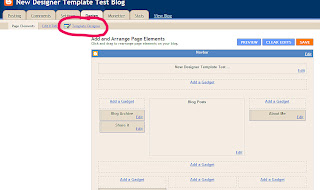
Step 2: Go into your Dashboard and click on "Template Designer" as shown above.
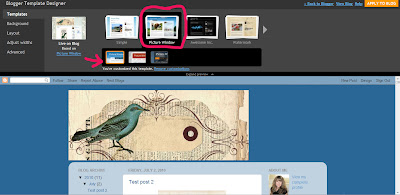
Step 3: Select "Picture Window". You will notice there are 3 options for "Picture Window", use the first one, next to the arrow, is the best option (with the blue sky). Select it by clicking on it.
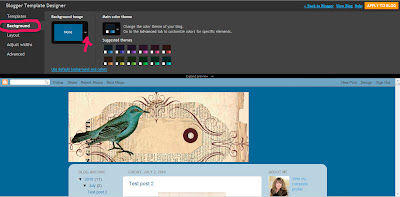
Step 4: Click on "Background" and you will see a screen like the one above. Then click on the tiny white arrow next to the box labeled "Background Image". You will then see a pop up box like the one in the image below.
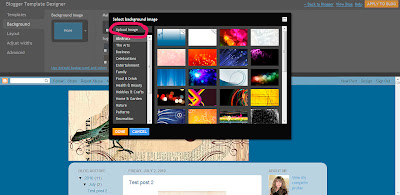
Step 5: In the pop up box select "Upload Image".
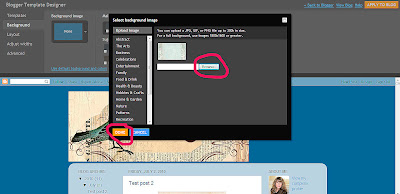
Step 6: Next click on "Browse" and find the background image that you have saved on your computer, and select it. Then click "Done".
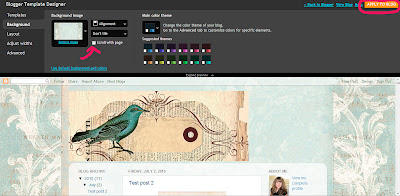 Step 7 - Make sure you deselect the box marked "Scroll with Page". (If you don't do this, your background won't fill the whole page, and it will look yucky!). Then click on "Apply to Blog".
Yay! Your done!!
(You can click on any of the images to see them larger)Step 1: The first thing really is that you will need to make sure you already have a background saved to your computer, since you will be uploading it later. You can use any of the ones that I've made from HERE, or you could use your own if you have one.
Step 2: Go into your Dashboard and click on "Template Designer" as shown above.
Step 3: Select "Picture Window". You will notice there are 3 options for "Picture Window", use the first one, next to the arrow, is the best option (with the blue sky). Select it by clicking on it.
Step 4: Click on "Background" and you will see a screen like the one above. Then click on the tiny white arrow next to the box labeled "Background Image". You will then see a pop up box like the one in the image below.
Step 5: In the pop up box select "Upload Image".

Step 6: Next click on "Browse" and find the background image that you have saved on your computer, and select it. Then click "Done".
Step 7 - Make sure you deselect the box marked "Scroll with Page". (If you don't do this, your background won't fill the whole page, and it will look yucky!). Then click on "Apply to Blog".Yay! Your done!!
3 Comments

